GeoGame in the classroom
The whole class races to the same hidden country — live. Everyone gets the same mystery country at the same time; every guess shows up on a 3D globe, coloured from icy blue (far away) to red (close), with the distance in kilometres, until someone turns it green. Free for schools: up to 30 players, one private link, no accounts, no ads.
What your class learns
- Where countries are. Students don't just recall names: they place each guess on the globe and see where it lies.
- Neighbours and regions. “Ethiopia is hot, so it must be next door”: students start reasoning with borders, regions and continents.
- Distances. Every guess shows how far it is from the hidden country, measured border to border. Over a few rounds, students build a feel for how big the world is and what lies close to what.
- Spelling country names. Party games use expert rules: you type the country's name (with suggestions as you type), with no clicking on the map and no direction hints.
Run a class party in 5 steps
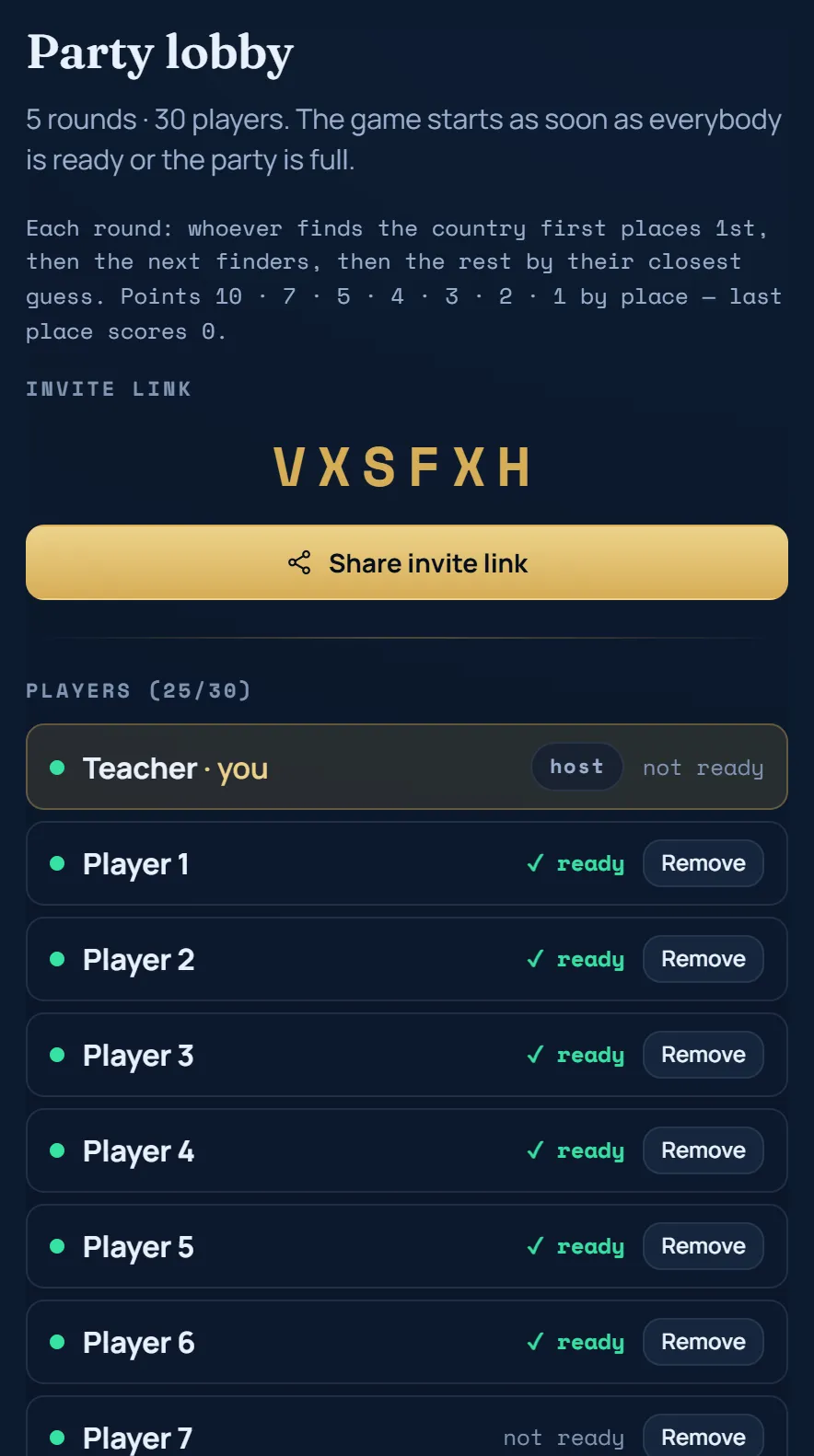
- Open GeoGame → Party → “Invite friends” (“Create invite link”) and choose the number of players (up to 30, including you) and rounds (1 to 20). Use this private party, not Quick play: Quick play is an open lobby where strangers can join.
- Click “Create party & get invite link”. You get a link and a short code.
- Share the link or the code. Put it on the board, in your class chat or in your learning platform. Students open it in a browser, type a name and they're in. Without the link or the code, nobody can join.
- Wait until everyone is in, then press “I'm ready”. The game starts by itself once every player in the lobby is ready, or as soon as the party is full; you can also press “Start now”. As long as you (the host) aren't ready and the party isn't full, it won't start without you. In the lobby you can remove a player you don't want in the game. Once the game has started, nobody new can join.
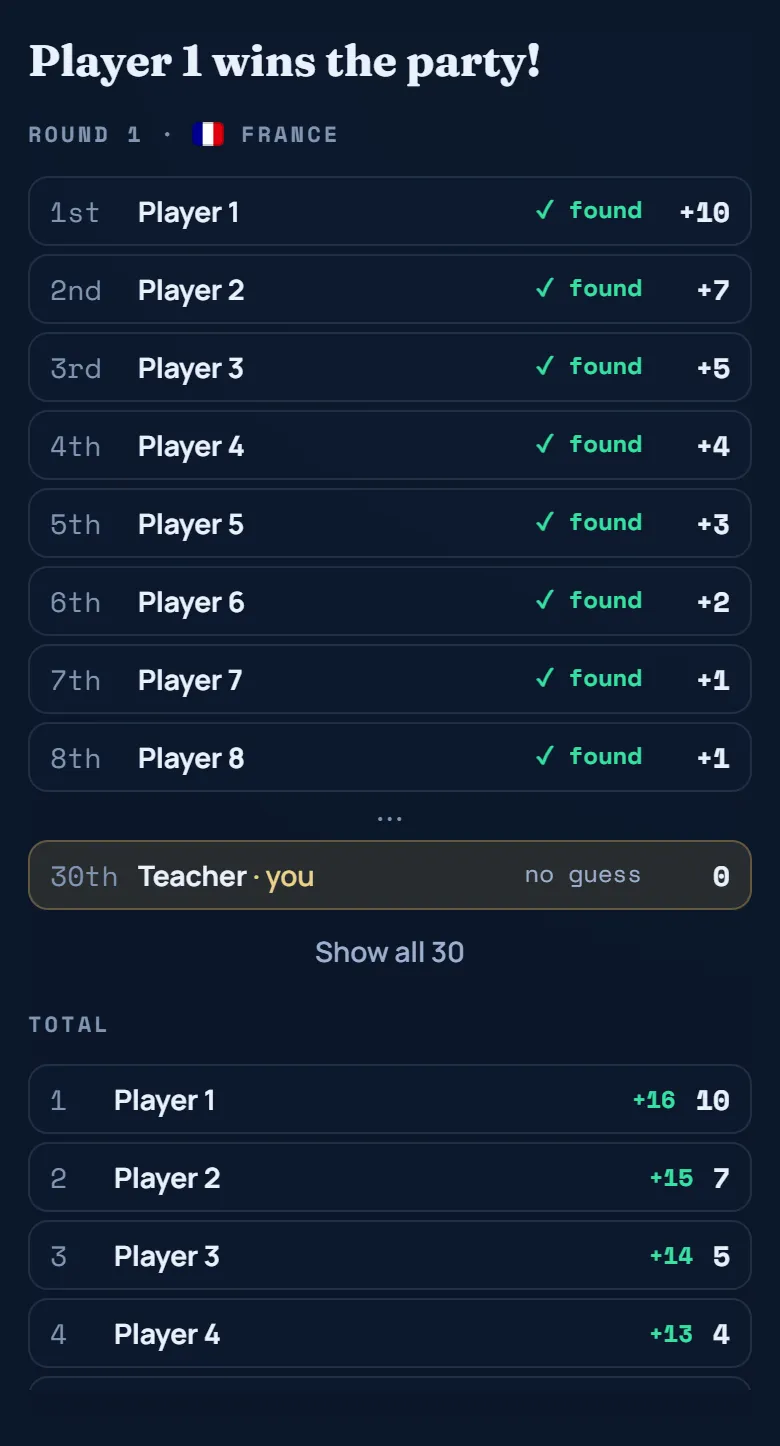
- Play. After a 3-2-1 countdown, everyone searches for the same hidden country. When the first player finds it, the others have 20 more seconds; after 4 minutes a round ends anyway. Points go by place (10, 7, 5, 4, 3, 2, then 1; the last place scores nothing), and after the last round a final leaderboard shows the winner.
No accounts needed
Students just type a first name or a nickname. No sign-up, no email, no password, and no age limit: students play as guests, no account needed. Party names are only shown to the other players in that party, and the party is deleted automatically after 3 days without activity.
Tip: names in a private party are not filtered automatically. Ask students to use their first name or a class nickname, and remove a player in the lobby if a name doesn't belong in class.
Works on the devices you have
GeoGame runs in any modern browser. Nothing to install, no app store.
- Chromebooks, laptops and PCs
- Tablets (iPad and Android)
- Phones
Students can mix devices in one party. The 3D globe needs a reasonably recent device and browser (WebGL); on very old machines it can be slow.
Privacy and safety
- No ads, and we don't sell data.
- No tracking cookies. We only use the cookies needed to sign in, and students playing without an account don't need them.
- No accounts, no email addresses. A party keeps the names players type, the countries they guess and the points, and deletes all of it after 3 days without activity. What stays is anonymous: game statistics without names, and for parties of three or more a Party Elo rating under a random guest number.
- Anonymous statistics. We count things like page views and finished rounds as plain totals that can't be traced to a person (Vercel Analytics and our own counters).
- Hosting. The site is hosted by Vercel and the database by Neon. Both may process data outside Switzerland and the EU, with standard contractual clauses in place. Details are in our Privacy Policy (Swiss FADP and EU GDPR).
- Questions? privacy@geo-game.io
Lesson ideas
- Warm-up (5 minutes): one round at the start of the lesson. Ask the winner: “Which clue gave it away?”
- Continent focus: after a round, put the globe on the projector and ask the class to name all the neighbours of the hidden country.
- Think aloud: one student plays on the projector, and the class suggests the next guess and explains why (“Egypt was warm, so let's go south”).
- Revision: a 10-round party at the end of a unit on Africa, Europe or Asia. Ask students to write down the countries they didn't know and look them up afterwards.
- Class vs. class: two classes each play a party with the same number of rounds and compare how many guesses the winners needed. Or play one big party with both classes (up to 30 players).
- Homework: the free daily country is the same for everyone in the world. Students can play it at home and compare tomorrow how many guesses they needed.
Questions teachers ask
Is GeoGame really free for schools?
Yes. GeoGame is free to play, including parties for a whole class. There are no ads and no paid version you need.
What age is it for?
There is no age limit: students play as guests, no account needed. They read and type country names (with suggestions as they type), so it suits classes that can do that comfortably.
Do my students need an account or an email address?
No. Students join with the link or the code and type a name. Nobody needs to sign up.
How many students can play at once?
Up to 30 players in one party, including you if you play along. With a bigger group, split the class into two parties.
What if a student drops out or closes the tab?
They can open the same party link again on the same device and browser, and they're back in their seat. A new student can't join once the game has started, so wait in the lobby until everybody is in.
Does it work on our school Wi-Fi?
GeoGame runs over normal HTTPS in the browser: no app, no special ports, no plug-ins. If your school network allows regular websites, it works. If it blocks unknown sites, ask your IT team to allow geo-game.io.
Can strangers join our game?
Not a private party: only people with your link or code can join, and you can remove players in the lobby. Quick play is different: it's an open lobby for anyone, so don't use it with a class.
Are student names checked?
Names in a private party are not filtered automatically. Ask students to use their first name or a class nickname. If a name doesn't belong in class, remove that player in the lobby; they can join again with another name.
What data do you store about my students?
Only what the party needs: the names they type, their guesses and their points, deleted after 3 days without activity. There are no accounts, no email addresses and no ads. What stays is anonymous: game statistics without names, and for parties of three or more a Party Elo rating under a random guest number.
Do I have to play myself?
You join as the host and take one of the 30 seats. You can play along or just watch the leaderboard on the projector.